Friday, 12 August 2016

Creating Custom Key Store Provider for SQL Always Encrypted (Without Key Vault Example PoC)

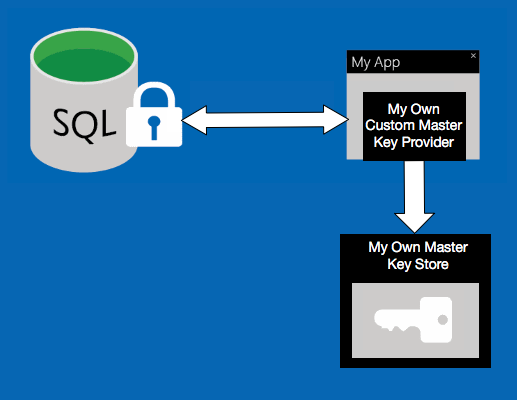
Recently we had to implement custom key store provider for always encrypted. We wanted it to access our own key store to retrieve the master key and to decrypt the column key.  It was not very clear how this can be achieved. So I've decided to produce a PoC and write an article about it.

Custom Key Store Provider for SQL Always Encrypted


Setup your C# application


Step 1:

Make sure your project is set to .NET Framework 4.6.

Step 2:

Implement your own custom store provider by extending  the SqlColumnEncryptionKeyStoreProvider and overriding the two methods:

 public class MyOwnCustomKeyStoreProvider : SqlColumnEncryptionKeyStoreProvider
    {

        string masterKeyThatWillNotBeHardcodedInYourApp = "someMasterKey";
        byte[] saltThatWillNotBeHardcodedInYourApp = UTF8Encoding.UTF8.GetBytes("someSalt");

        //This will constantly get used
        public override byte[] DecryptColumnEncryptionKey(string masterKeyPath, string encryptionAlgorithm, byte[] encryptedColumnEncryptionKey)
        {
            using (MemoryStream ms = new MemoryStream())
            {
                using (RijndaelManaged AES = new RijndaelManaged())
                {
                    AES.KeySize = 256;
                    AES.BlockSize = 128;

                    Rfc2898DeriveBytes keyBytes = new Rfc2898DeriveBytes(
                            masterKeyThatWillNotBeHardcodedInYourApp, 
                            saltThatWillNotBeHardcodedInYourApp, 
                            1000
                       );
                    AES.Key = keyBytes.GetBytes(AES.KeySize / 8);
                    AES.IV = keyBytes.GetBytes(AES.BlockSize / 8);

                    AES.Mode = CipherMode.CBC;

                    using (CryptoStream cs = new CryptoStream(ms, AES.CreateDecryptor(), CryptoStreamMode.Write))
                    {
                        cs.Write(encryptedColumnEncryptionKey, 0, encryptedColumnEncryptionKey.Length);
                        cs.Close();
                    }
                    encryptedColumnEncryptionKey = ms.ToArray();
                }
            }

            return encryptedColumnEncryptionKey;
        }

        //This will never get used by the app, I've used it just to encrypt the column key
        public override byte[] EncryptColumnEncryptionKey(string masterKeyPath, string encryptionAlgorithm, byte[] columnEncryptionKey)
        {
            byte[] encryptedBytes = null;
            using (MemoryStream ms = new MemoryStream())
            {
                using (RijndaelManaged AES = new RijndaelManaged())
                {
                    AES.KeySize = 256;
                    AES.BlockSize = 128;

                    Rfc2898DeriveBytes keyBytes = new Rfc2898DeriveBytes(
                            masterKeyThatWillNotBeHardcodedInYourApp,
                            saltThatWillNotBeHardcodedInYourApp,
                            1000
                       );

                    AES.Key = keyBytes.GetBytes(AES.KeySize / 8);
                    AES.IV = keyBytes.GetBytes(AES.BlockSize / 8);

                    AES.Mode = CipherMode.CBC;

                    using (CryptoStream cs = new CryptoStream(ms, AES.CreateEncryptor(), CryptoStreamMode.Write))
                    {
                        cs.Write(columnEncryptionKey, 0, columnEncryptionKey.Length);
                        cs.Close();
                    }
                    encryptedBytes = ms.ToArray();
                }
            }

            return encryptedBytes;
        }
    }


Step 3:

Register your provider with the SqlConnection:

            //Register your encryption key strategies 
            Dictionary<string, SqlColumnEncryptionKeyStoreProvider> providerStrategies =
                new Dictionary<string, SqlColumnEncryptionKeyStoreProvider>();

            providerStrategies.Add("MY_OWN_CUSTOM_KEY_STORE_PROVIDER", new MyOwnCustomKeyStoreProvider());

            SqlConnection.RegisterColumnEncryptionKeyStoreProviders(providerStrategies);

Step 4:

Now, pay attention. Make sure that your connection is configured correctly, I've spent several hours trying to figure out why my setup was not working. It was all because I did not include "Column Encryption Setting=Enabled" in the connection string:

 new SqlConnection("Server=tcp:some.database.windows.net,1433;Database=testing;User ID=testing@testing;Password=Password;Trusted_Connection=False;Encrypt=True;Connection Timeout=30;Column Encryption Setting=Enabled")

If you  don't include Column Encryption Setting=Enabled, you will get unhelpful exception like this:

An unhandled exception of type 'System.Data.SqlClient.SqlException' occurred in System.Data.dll

Additional information: Operand type clash: nvarchar is incompatible with nvarchar(11) encrypted with (encryption_type = 'DETERMINISTIC', encryption_algorithm_name = 'AEAD_AES_256_CBC_HMAC_SHA_256', column_encryption_key_name = 'MO_CEK1', column_encryption_key_database_name = 'sometest')


Incorrect parameter encryption metadata was received from the client. The error occurred during the invocation of the batch and therefore the client can refresh the parameter encryption metadata by calling sp_describe_parameter_encryption and retry.


Setup your database


Step 1:

Define your custom key store provider:

 CREATE COLUMN MASTER KEY [MO_CMKSP] --Stands for My Own Custom Key Store Provider
 WITH ( KEY_STORE_PROVIDER_NAME = 'MY_OWN_CUSTOM_KEY_STORE_PROVIDER', 
 KEY_PATH = 'MyKeyStoreWillNotUseThis')

Step 2:

Define the column encryption key that will get unwrapped by your own custom key store provider. Encrypted value needs to be some random value that gets encrypted by your master key and stored here as a hexadecimal:

 CREATE COLUMN ENCRYPTION KEY [MO_CEK1] -- Stands for My Own Column Encryption Key 1
 WITH VALUES
 (
  COLUMN_MASTER_KEY = [MO_CMKSP],
  ALGORITHM = 'RSA_OAEP',
  ENCRYPTED_VALUE = 0x29128e12266a71dd098bc3223b3bbf293a275b2ec8c13f97515f54dd7d2a54af46f37071e0e16e777d73f4a743ddb991
 )


Step 3:

Encrypt columns by specifying the column encryption key:

 CREATE TABLE [dbo].[Employee](
  [Id] [int] IDENTITY(1,1) NOT NULL,
  [SSN] [nvarchar](11) COLLATE Latin1_General_BIN2
  ENCRYPTED WITH (
   COLUMN_ENCRYPTION_KEY = [MO_CEK1],
   ENCRYPTION_TYPE = Deterministic,
   ALGORITHM = 'AEAD_AES_256_CBC_HMAC_SHA_256'
  ) NOT NULL,
  [Salary][int] 
  ENCRYPTED WITH (
   COLUMN_ENCRYPTION_KEY = [MO_CEK1],
   ENCRYPTION_TYPE = RANDOMIZED,
   ALGORITHM = 'AEAD_AES_256_CBC_HMAC_SHA_256'
  ) NOT NULL,
  PRIMARY KEY CLUSTERED
  (
  [Id] ASC
  )WITH (PAD_INDEX = OFF, STATISTICS_NORECOMPUTE = OFF, IGNORE_DUP_KEY = OFF, ALLOW_ROW_LOCKS = ON, ALLOW_PAGE_LOCKS = ON) ON [PRIMARY]
 ) ON [PRIMARY]

 CREATE TABLE [dbo].[EmployeeExtraInformation](
  [Id] [int] IDENTITY(1,1) NOT NULL,
  [EyeColor] [nvarchar](11) NOT NULL,
  [SSN] [nvarchar](11) COLLATE Latin1_General_BIN2
  ENCRYPTED WITH (
   COLUMN_ENCRYPTION_KEY = [MO_CEK1],
   ENCRYPTION_TYPE = Deterministic,
   ALGORITHM = 'AEAD_AES_256_CBC_HMAC_SHA_256'
  ) NOT NULL,
  PRIMARY KEY CLUSTERED
  (
  [Id] ASC
  )WITH (PAD_INDEX = OFF, STATISTICS_NORECOMPUTE = OFF, IGNORE_DUP_KEY = OFF, ALLOW_ROW_LOCKS = ON, ALLOW_PAGE_LOCKS = ON) ON [PRIMARY]
 ) ON [PRIMARY]


PoC Code


Program.cs

using System;
using System.Collections.Generic;
using System.Data.SqlClient;

namespace CustomKeyStoreProvider
{
    class Program
    {
        static void Main(string[] args)
        {
            //Register your encryption key strategies 
            Dictionary<string, SqlColumnEncryptionKeyStoreProvider> providerStrategies =
                new Dictionary<string, SqlColumnEncryptionKeyStoreProvider>();

            providerStrategies.Add("MY_OWN_CUSTOM_KEY_STORE_PROVIDER", new MyOwnCustomKeyStoreProvider());


            //Apparently this works transparently with the Hibernate and the Entity Framework!
            SqlConnection.RegisterColumnEncryptionKeyStoreProviders(providerStrategies);

            using (SqlConnection connection = new SqlConnection({Your connection string};Column Encryption Setting=Enabled))
            {
                connection.Open();
                string ssn;
                using (SqlCommand command = connection.CreateCommand())
                {
                    command.CommandText = "INSERT INTO [dbo].[Employee] VALUES (@ssn, @salary)";
                    Random rand = new Random();
                    ssn = string.Format(@"{0:d3}-{1:d2}-{2:d4}", rand.Next(0, 1000), rand.Next(0, 100), rand.Next(0, 10000));
                    command.Parameters.AddWithValue("@ssn", ssn);
                    command.Parameters.AddWithValue("@salary", 18000);
                    command.ExecuteNonQuery();
                }

                using (SqlCommand command = connection.CreateCommand())
                {
                    command.CommandText = "INSERT INTO [dbo].[EmployeeExtraInformation] (eyecolor, ssn) VALUES (@eyecolor, @ssn)";
                    command.Parameters.AddWithValue("@eyecolor", "blue");
                    command.Parameters.AddWithValue("@ssn", ssn);
                    command.ExecuteNonQuery();
                }

                //Show stored data unencrypted 
                using (SqlCommand command = connection.CreateCommand())
                {
                    command.CommandText = "SELECT [id], [ssn], [salary] FROM [dbo].[Employee]";
                    using (SqlDataReader reader = command.ExecuteReader())
                    {
                        if(reader.HasRows)
                        {
                            Console.WriteLine("-- Showing all rows:");
                            while (reader.Read())
                            {
                                Console.WriteLine($"id : {reader["id"]}, ssn : {reader["ssn"]}, salary : {reader["salary"]}");
                            }
                        }
                    }
                }

                //Equals search, this actually works
                using(SqlCommand command = connection.CreateCommand())
                {
                    command.CommandText = "SELECT [id], [ssn], [salary] FROM [dbo].[Employee] WHERE [ssn] = @ssn";
                    command.Parameters.AddWithValue("@ssn", ssn);

                    using (SqlDataReader reader = command.ExecuteReader())
                    {
                        if (reader.HasRows)
                        {
                            Console.WriteLine($"-- Showing found record for ssn {ssn}:");
                            while (reader.Read())
                            {
                                Console.WriteLine($"id : {reader["id"]}, ssn : {reader["ssn"]}, salary : {reader["salary"]}");
                            }
                        }
                    }
                }

                //Inner Join, this works as well
                using (SqlCommand command = connection.CreateCommand())
                {
                    command.CommandText = @"SELECT [dbo].[Employee].[salary], [dbo].[Employee].[ssn], [dbo].[EmployeeExtraInformation].[eyecolor] FROM [dbo].[Employee] 
                                                    INNER JOIN [dbo].[EmployeeExtraInformation] ON [dbo].[Employee].[ssn] = [dbo].[EmployeeExtraInformation].[ssn]";

                    using (SqlDataReader reader = command.ExecuteReader())
                    {
                        if (reader.HasRows)
                        {
                            Console.WriteLine($"-- Showing all records inner joined:");
                            while (reader.Read())
                            {
                                Console.WriteLine($"eyecolor : {reader["eyecolor"]}, ssn : {reader["ssn"]}, salary : {reader["salary"]}");
                            }
                        }
                    }
                }

                try
                {
                    using (SqlCommand command = connection.CreateCommand())
                    {
                        command.CommandText = "SELECT [id], [ssn], [salary] FROM [dbo].[Employee] WHERE [ssn] like @ssn";
                        command.Parameters.AddWithValue("@ssn", ssn);

                        command.ExecuteReader();
                    }
                }
                catch (Exception ex)
                {
                    Console.WriteLine("-- As expected, can't search on ssn using like:");
                    Console.WriteLine(ex.Message);
                }

                try
                {
                    using (SqlCommand command = connection.CreateCommand())
                    {
                        command.CommandText = "SELECT [id], [ssn], [salary] FROM [dbo].[Employee] WHERE [salary] = @salary";
                        command.Parameters.AddWithValue("@salary", 18000);

                        command.ExecuteReader();
                    }
                }
                catch(Exception ex)
                {
                    Console.WriteLine("-- As expected, can't search on salary, it is a randomized field:");
                    Console.WriteLine(ex.Message);
                }

                connection.Close();
            }

            Console.ReadLine(); 
        }
    }
}

MyOwnCustomKeyStoreProvider.cs

using System.Data.SqlClient;
using System.IO;
using System.Security.Cryptography;
using System.Text;

namespace CustomKeyStoreProvider
{
    public class MyOwnCustomKeyStoreProvider : SqlColumnEncryptionKeyStoreProvider
    {

        string masterKeyThatWillNotBeHardcodedInYourApp = "someMasterKey";
        byte[] saltThatWillNotBeHardcodedInYourApp = UTF8Encoding.UTF8.GetBytes("someSalt");

        //This will constantly get used
        public override byte[] DecryptColumnEncryptionKey(string masterKeyPath, string encryptionAlgorithm, byte[] encryptedColumnEncryptionKey)
        {
            using (MemoryStream ms = new MemoryStream())
            {
                using (RijndaelManaged AES = new RijndaelManaged())
                {
                    AES.KeySize = 256;
                    AES.BlockSize = 128;

                    Rfc2898DeriveBytes keyBytes = new Rfc2898DeriveBytes(
                            masterKeyThatWillNotBeHardcodedInYourApp, 
                            saltThatWillNotBeHardcodedInYourApp, 
                            1000
                       );
                    AES.Key = keyBytes.GetBytes(AES.KeySize / 8);
                    AES.IV = keyBytes.GetBytes(AES.BlockSize / 8);

                    AES.Mode = CipherMode.CBC;

                    using (CryptoStream cs = new CryptoStream(ms, AES.CreateDecryptor(), CryptoStreamMode.Write))
                    {
                        cs.Write(encryptedColumnEncryptionKey, 0, encryptedColumnEncryptionKey.Length);
                        cs.Close();
                    }
                    encryptedColumnEncryptionKey = ms.ToArray();
                }
            }

            return encryptedColumnEncryptionKey;
        }

        //This will never get used by the app, I've used it just to encrypt the column key
        public override byte[] EncryptColumnEncryptionKey(string masterKeyPath, string encryptionAlgorithm, byte[] columnEncryptionKey)
        {
            byte[] encryptedBytes = null;
            using (MemoryStream ms = new MemoryStream())
            {
                using (RijndaelManaged AES = new RijndaelManaged())
                {
                    AES.KeySize = 256;
                    AES.BlockSize = 128;

                    Rfc2898DeriveBytes keyBytes = new Rfc2898DeriveBytes(
                            masterKeyThatWillNotBeHardcodedInYourApp,
                            saltThatWillNotBeHardcodedInYourApp,
                            1000
                       );

                    AES.Key = keyBytes.GetBytes(AES.KeySize / 8);
                    AES.IV = keyBytes.GetBytes(AES.BlockSize / 8);

                    AES.Mode = CipherMode.CBC;

                    using (CryptoStream cs = new CryptoStream(ms, AES.CreateEncryptor(), CryptoStreamMode.Write))
                    {
                        cs.Write(columnEncryptionKey, 0, columnEncryptionKey.Length);
                        cs.Close();
                    }
                    encryptedBytes = ms.ToArray();
                }
            }

            return encryptedBytes;
        }
    }
}


Setup.sql

CREATE COLUMN MASTER KEY [MO_CMKSP] --Stands for My Own Custom Key Store Provider
 WITH ( KEY_STORE_PROVIDER_NAME = 'MY_OWN_CUSTOM_KEY_STORE_PROVIDER', 
 KEY_PATH = 'MyKeyStoreWillNotUseThis')

GO 

CREATE COLUMN ENCRYPTION KEY [MO_CEK1] -- Stands for My Own Column Encryption Key 1
 WITH VALUES
 (
  COLUMN_MASTER_KEY = [MO_CMKSP],
  ALGORITHM = 'RSA_OAEP',
  ENCRYPTED_VALUE = 0x29128e12266a71dd098bc3223b3bbf293a275b2ec8c13f97515f54dd7d2a54af46f37071e0e16e777d73f4a743ddb991
 )
GO

CREATE TABLE [dbo].[Employee](
  [Id] [int] IDENTITY(1,1) NOT NULL,
  [SSN] [nvarchar](11) COLLATE Latin1_General_BIN2
  ENCRYPTED WITH (
   COLUMN_ENCRYPTION_KEY = [MO_CEK1],
   ENCRYPTION_TYPE = Deterministic,
   ALGORITHM = 'AEAD_AES_256_CBC_HMAC_SHA_256'
  ) NOT NULL,
  [Salary][int] 
  ENCRYPTED WITH (
   COLUMN_ENCRYPTION_KEY = [MO_CEK1],
   ENCRYPTION_TYPE = RANDOMIZED,
   ALGORITHM = 'AEAD_AES_256_CBC_HMAC_SHA_256'
  ) NOT NULL,
  PRIMARY KEY CLUSTERED
  (
  [Id] ASC
  )WITH (PAD_INDEX = OFF, STATISTICS_NORECOMPUTE = OFF, IGNORE_DUP_KEY = OFF, ALLOW_ROW_LOCKS = ON, ALLOW_PAGE_LOCKS = ON) ON [PRIMARY]
 ) ON [PRIMARY]

 CREATE TABLE [dbo].[EmployeeExtraInformation](
  [Id] [int] IDENTITY(1,1) NOT NULL,
  [EyeColor] [nvarchar](11) NOT NULL,
  [SSN] [nvarchar](11) COLLATE Latin1_General_BIN2
  ENCRYPTED WITH (
   COLUMN_ENCRYPTION_KEY = [MO_CEK1],
   ENCRYPTION_TYPE = Deterministic,
   ALGORITHM = 'AEAD_AES_256_CBC_HMAC_SHA_256'
  ) NOT NULL,
  PRIMARY KEY CLUSTERED
  (
  [Id] ASC
  )WITH (PAD_INDEX = OFF, STATISTICS_NORECOMPUTE = OFF, IGNORE_DUP_KEY = OFF, ALLOW_ROW_LOCKS = ON, ALLOW_PAGE_LOCKS = ON) ON [PRIMARY]
 ) ON [PRIMARY]


Useful links:

*Note: Code in this article is not production ready and is used for prototyping purposes only. If you have suggestions or feedback please do comment. 

Sunday, 7 August 2016

How to use TypeScript with FlotCharts or any other external JavaScript library

I've started using TypeScript recently and I wanted to interact with FlotCharts. I had two questions on my mind:
  1. How does non TypeScript library interact with TypeScript app?
  2. How do I use FlotCharts now? Has the interface completely changed? 
This article will answer these questions and provide you with two implementation examples.


Step 1:

Get the FlotChart Type definition file. You can do this via NuGet by invoking this command: 
Install-Package flot.TypeScript.DefinitelyTyped. 

Type definition file is just an interface that is used to interact with the native JavaScript code. 


Step 2:

Get the actual FlotCharts library. You can do this via NuGet by invoking this command:
Install-Package flot 


Step 3:

Check your "Scripts" folder structure, it should look something like this:


Step 4:

Take a look at the query.flot interfaces, they can be found here: Scripts/Typings/flot/jquery.flot.d.


Step 5 - Implementation:


Explicit Approach
If you are a strong type purist you can go all the way and actually implement the defined interfaces like so:
class DataSeries implements jquery.flot.dataSeries {

    label: string;
    data: Array<Array<number>> = new Array<Array<number>>();

    constructor(label: string, data: Array<Array<number>>) {
        this.label = label;
        this.data = data;
    }
}

class PlotOptions implements jquery.flot.plotOptions {
    grid: jquery.flot.gridOptions;
    constructor(grid: jquery.flot.gridOptions) {
        this.grid = grid;
    }
}

class GridOptions implements jquery.flot.gridOptions {
    show: boolean;
    constructor(show: boolean) {
        this.show = show;
    }
}
Once you have implemented your classes, you can interact with the FlotChart library like this:
    let dataSeriesA: DataSeries = new DataSeries("A", [[0, 10], [1, 20], [2, 30]]);
    let dataSeriesB: DataSeries = new DataSeries("B", [[0, 5], [1, 3], [2, 50]]);
    let plotElement: JQuery = jQuery("#plot");
    jQuery.plot(plotElement, [dataSeriesA, dataSeriesB], new PlotOptions(new GridOptions(false)));

Implicit Approach
If you don't want to implement classes and just want to provide objects you can interact with the FlotChart library like this instead:
    $.plot(
        $("#plot"),
        [
            { label: "A", data: [[0, 10], [1, 20], [2, 30]] },
            { label: "B", data: [[0, 5], [1, 3], [2, 50]] }
        ],
        {
            grid: {
                show : false
            }
        } 
    );

Sample code


App.ts:
 

class DataSeries implements jquery.flot.dataSeries {
    label: string;
    data: Array<Array<number>> = new Array<Array<number>>();
    constructor(label: string, data: Array<Array<number>>) {
        this.label = label;
        this.data = data;
    }
}

class PlotOptions implements jquery.flot.plotOptions {
    grid: jquery.flot.gridOptions;
    constructor(grid: jquery.flot.gridOptions) {
        this.grid = grid;
    }
}

class GridOptions implements jquery.flot.gridOptions {
    show: boolean;
    constructor(show: boolean) {
        this.show = show;
    }
}

function explicit() {
    let dataSeriesA: DataSeries = new DataSeries("A", [[0, 10], [1, 20], [2, 30]]);
    let dataSeriesB: DataSeries = new DataSeries("B", [[0, 5], [1, 3], [2, 50]]);
    let plotElement: JQuery = jQuery("#plotE");
    jQuery.plot(plotElement, [dataSeriesA, dataSeriesB], new PlotOptions(new GridOptions(false)));
}

function implicit() {
    $.plot(
        $("#plotI"),
        [
            { label: "A", data: [[0, 10], [1, 20], [2, 30]] },
            { label: "B", data: [[0, 5], [1, 3], [2, 50]] }
        ],
        {
            grid: {
                show : false
            }
        }
    );
}

window.onload = () => {
    explicit();
    implicit();
};


Index.html:
 
<!DOCTYPE html>

<html lang="en">
<head>
    <meta charset="utf-8" />
    <title>TypeScript With Flot Demo</title>
    <script src="Scripts/jquery-1.4.1.js"></script>
    <script src="Scripts/flot/jquery.flot.js"></script>
    <script src="app.js"></script>
</head>
<body>
    <h1>TypeScript with Flot demo</h1>

    <div class="plot-container">
        <div id="plotE" style="width:500px;height:500px;"></div>
        <div id="plotI" style="width:500px;height:500px;"></div>
    </div>

</body>
</html>

Summary:

  1. TypeScript apps interact with non TypeScript libraries through definition files.
  2. Library interfaces remain mostly the same. 
  3. You can interface explicitly by actually implementing reusable classes or implicitly by using objects.

Useful links:

*Note: Code in this article is not production ready and is used for prototyping purposes only. If you have suggestions or feedback please do comment. 

Wednesday, 1 June 2016

Applied Domain-Driven Design (DDD), Part 7 - Read Model

When I first started using DDD I came across a really messy situation. I had my aggregate root and it linked it self to another child aggregate root. Everything worked really well. Shortly after everything was written new requirement came through, I had to expose counts and sums of data based on different filters. This was very painful, I ended up modifying my aggregate roots to try and provide these additional properties. This approach did not perform, for each aggregate root, it was loading another aggregate root with entities and summing them. I've played around with NHibernate mapping files and I've managed to make it performant. By this point I've optimized NHibernate mapping files and my aggregate roots were polluted with query methods. I really didn't like this approach. Shortly after I've came up with another idea, how about we create an immutable model that maps directly to the SQL view and we let the infrastructure handle the mapping? This way our aggregate roots will remain unaffected and we will get much better performance through SQL querying! This is when I have discovered the read model.

In this article we are going to explore how we can end up in this messy situation and why you should use the read model for data mash up and summarisation.

Let's recap how our fictional domain model looks like (omitted to show properties only):
  
    public class Customer : IDomainEntity
    {
        private List<purchase> purchases = new List<purchase>();

        public virtual Guid Id { get; protected set; }
        public virtual string FirstName { get; protected set; }
        public virtual string LastName { get; protected set; }
        public virtual string Email { get; protected set; }

        public virtual ReadOnlyCollection<purchase> Purchases { get { return this.purchases.AsReadOnly(); } }
    }

    public class Purchase
    {
        private List<purchasedproduct> purchasedProducts = new List<purchasedproduct>();

        public Guid Id { get; protected set; }
        public ReadOnlyCollection<purchasedproduct> Products
        {
            get { return purchasedProducts.AsReadOnly(); }
        }
        public DateTime Created { get; protected set; }
        public Customer Customer { get; protected set; }
        public decimal TotalCost { get; protected set; }
    }

    public class PurchasedProduct
    {
        public Purchase Purchase { get; protected set; }
        public Product Product { get; protected set; }
        public int Quantity { get; protected set; }
    }
Please notice the deep relationship between Customer, Purchase and Purchased Product.

New Requirement 
Back office team has just come up with a brand new requirement. They need to get a list of customers that have made purchases, they want to see how much they have spent overall and how many products they have purchased. They are going to contact these customers, thank them for their custom, ask them few questions and give them discount vouchers.

Here is the DTO that we will need to populate and return back via API:
    
    public class CustomerPurchaseHistoryDto
    {
        public Guid CustomerId { get; set; }
        public string FirstName { get; set; }
        public string LastName { get; set; }
        public string Email { get; set; }
        public int TotalPurchases { get; set; }
        public int TotalProductsPurchased { get; set; }
        public decimal TotalCost { get; set; }
    }

#Approach 1 - Domain Model DTO Projection
   
        public List<CustomerPurchaseHistoryDto> GetAllCustomerPurchaseHistory()
        {
            IEnumerable<Customer> customers =
                 this.customerRepository.Find(new CustomerPurchasedNProductsSpec(1));

            List<CustomerPurchaseHistoryDto> customersPurchaseHistory =
                new List<CustomerPurchaseHistoryDto>();

            foreach (Customer customer in customers)
            {
                CustomerPurchaseHistoryDto customerPurchaseHistory = new CustomerPurchaseHistoryDto();
                customerPurchaseHistory.CustomerId = customer.Id;
                customerPurchaseHistory.FirstName = customer.FirstName;
                customerPurchaseHistory.LastName = customer.LastName;
                customerPurchaseHistory.Email = customer.Email;
                customerPurchaseHistory.TotalPurchases = customer.Purchases.Count;
                customerPurchaseHistory.TotalProductsPurchased =
                    customer.Purchases.Sum(purchase => purchase.Products.Sum(product => product.Quantity));
                customerPurchaseHistory.TotalCost = customer.Purchases.Sum(purchase => purchase.TotalCost);
                customersPurchaseHistory.Add(customerPurchaseHistory);

            }
            return customersPurchaseHistory;
        } 

With this approach we have to get every customer, for that customer get their purchases, for that purchase get the products that were actually purchased and then sum it all up (lines 16-19). That's a lot of lazy loading. You could fine tune your NHibernate mapping so that it gets all of this data using joins in one go. However that will mean you will be getting unnecessary child data when you are interested only in the parent data (Customer).  Also what if your domain-model is not exposing some of the data that you would like summarise? Now you have to add extra properties to your aggregate roots to make this work. Messy.

#Approach 2 - Infrastructure Read Model Projection 
    
    /*Read only model, I don't think read models should have "readmodel" suffix. 
    We don't suffix Customer, we don't write CustomerDomainModel or CustomerModel we just write Customer. 
    We do this because it's part of the ubiquitous language, same goes for the CustomerPurchaseHistory. 
    I've added this suffix here just to make things more obvious. */
    public class CustomerPurchaseHistoryReadModel
    {
        public Guid CustomerId { get; set; }
        public string FirstName { get; set; }
        public string LastName { get; set; }
        public int TotalPurchases { get; set; }
        public int TotalProductsPurchased { get; set; }
        public decimal TotalCost { get; set; }
    }

    public List<CustomerPurchaseHistoryDto> GetAllCustomerPurchaseHistory()
    {
        IEnumerable<CustomerPurchaseHistoryReadModel> customersPurchaseHistory =
                this.customerRepository.GetCustomerPurchaseHistory();

        return AutoMapper.Mapper.Map<IEnumerable<CustomerPurchaseHistoryReadModel>, List<CustomerPurchaseHistoryDto>>(customersPurchaseHistory);
    }

    interface ICustomerRepository : IRepository<Customer>
    {
        IEnumerable<CustomerPurchaseHistoryReadModel> GetCustomersPurchaseHistory();
    }

    public class CustomerNHRepository : ICustomerRepository
    {
        public IEnumerable<CustomerPurchaseHistoryReadModel> GetCustomersPurchaseHistory()
        {
            //Here you either call a SQL view, do HQL joins, etc.
            throw new NotImplementedException();
        }
    }

In this example we have created CustomerPurchaseHistoryReadModel which is identical to CustomerPurchaseHistoryDto, which means I can keep things simple and just use AutoMapper to do one to one mapping. I've extended IRepository by creating new interface ICustomerRepository and added custom method GetCustomersPurchaseHistory(). Now I need to fill in CustomerNHRepository.GetCustomersPurchaseHistory() method. As we are now in the infrastructure layer we can just write some custom HQL or query a SQL view.


Summary:
  • Don't use your entities and aggregate roots for properties mush up or summarisation. Create read models where these properties are required. 
  • Infrastructure layer should take care of the mapping. For example, use HQL to project data on to your read model.
  • Reads models are just that, read only models. This is why they are performant and this is why they should have no methods on them and just properties (they are immutable). 

Useful links: 

*Note: Code in this article is not production ready and is used for prototyping purposes only. If you have suggestions or feedback please do comment. 

Saturday, 28 May 2016

JQuery chaining animations with different elements

As I was writing throughput simulator I came across an interesting problem, how do you actually chain JQuery animations with different dynamic elements?


If your code is static, this is simple,  you could just do this:
 
$("#someElement").animate({
    "top": "200px",
    "left": "0px"
}, 2000, function () {
    $("#someElement2").animate({

        "z-index": "-1",
        "top": "100px",
        "left": "0px",
        "width": "220px"

    }, 2000);
});

You are just invoking a function and on complete you are invoking the next function. JQuery has made this very simple for us. Thank you JQuery.

But what if your elements are not static? What if you are adding elements at runtime to HTML and you need to chain these different elements together? How do you achieve same thing in a dynamic way?

Wouldn't it be great if you could do something like this:
    
CompletionChain().Add(function (completed) {
    $("#someElement").animate({
        "top": "200px",
        "left": "0px"
    }, 2000, completed);
})
    .Add(function (completed) {
        $("#someElement2").animate({
            "z-index": "-1",
            "top": "100px",
            "left": "0px",
            "width": "220px"
        }, 2000, completed);
    })
    .Add(function (completed) {
        $("#someElement3").fadeOut(2000).fadeIn(2000, completed);
    })
    .Run(function () {
        //doSomething
    })

This approach allows you to add animations to a queue at runtime and running the entire chain by calling Run(). Unfortunately this is not part of the JQuery API,  however I have written a class to do just that:
    
function CompletionChain() {
    this.chainIndex = 0;
    this.chainList = [];
    this.onComplete = function () { };
                    
    this.Add = function (funcToComplete) {
        var myself = this;
        this.chainList.push(function () {
            funcToComplete(function () {
                myself.chainIndex++;
                myself.execNextFuncInTheChain(myself.chainIndex);
            });

        });
        return myself;
    }

    this.Run = function (onComplete) {
        if (onComplete != null)
            this.onComplete = onComplete;

        this.execNextFuncInTheChain(0);
    }

    this.execNextFuncInTheChain = function (index) {
        if (this.chainList[index] != null) {
            this.chainList[index]();
        } else {
            this.onComplete();
        }
    }

    return this;
} 

The idea is, don't execute the animation straight away, store it in a list. When you are ready invoke Run(), CompletionChain will invoke the first function in the chain and after it completes the first function it will invoke the next function in the chain. It will keep going until it reaches the end and then it will call onComplete. Idea was partially taken from the Linked list algorithm and Command design pattern.

Here it is in action:


*Note: Code in this article is not production ready and is used for prototyping purposes only. If you have suggestions or feedback please do comment. 


Tuesday, 24 May 2016

Agility and lean production throughput simulator with animations (written in JavaScript)

One year ago I have visited one of the most beautiful cities in the world, Florence. While I was there I went inside the Cathedral of Florence. It's amazing, I recommend it.

Cathedral of Florence

Anyway, I am not a travel guide so let's get to the point. This article was inspired by the Cathedral of Florence, why? Queues. I was standing a in a queue for ages and it felt extremely inefficient how they have handled the flow of people. We were standing around for a while, then we would move (it felt random when we moved), some people would stop as they would get out of breath, some people would stop to take pictures, some people would get claustrophobic and start walking back, when you finally get to the top, they use same stairs to go up to the roof and to come down. Roof would also not be jam packed it seemed actually a bit empty. The whole experience just felt extremely inefficient. This is often how software delivery feels like, inefficient and random.

In this article I am going to simulate my experience in the Cathedral of Florence and hopefully convince you that all we need to do is get back to the first principles of good throughput i.e. removing interlocks to zero and reducing wait times.

Simulation Rules:

Simulation was simplified for my and the audience benefit, ball in the queue can either move forward or just stand around. Ball in the queue can't move forward if there is a ball in front of it. If queue is full ball will not be added to the queue. These rules will keep our simulation simple.

Simulation 1: My experience, slow stop start flow

Everyone walking at same speed but stopping randomly.

Average lead time (sec): ...
Running time (sec): ...
Interlocks: ...
Total Arrived: ...
Delivered per second: ...

After 50,000 iterations here are the results 
Average lead time (milliseconds): 6.23
Running time (milliseconds): 930
Interlocks: 604,706
Total arrived: 8,669 (17.3%)
Delivered per millisecond: 9.32

Simulation 2: Probably how it actually was, chaos flow

Everyone walking at random speed and stoping randomly.

Average lead time (sec): ...
Running time (sec): ...
Interlocks: ...
Total Arrived: ...
Delivered per second: ...

After 50,000 iterations here are the results 
Average lead time (milliseconds): 1.93
Running time (milliseconds): 598
Interlocks: 346,437
Total arrived: 9,569 (19.19%)
Delivered per millisecond: 15.994

Simulation 3: How it should have been in the ideal world, single piece flow

Everyone walks at the same speed and doesn't stop as there is no need to stop. 

Average lead time (sec): ...
Running time (sec): ...
Interlocks: ...
Total Arrived: ...
Delivered per second: ...

After 50,000 iterations here are the results 
Average lead time (milliseconds): 3.041
Running time (milliseconds): 1535.21
Interlocks: 0
Total arrived: 49901 (99.8%)
Delivered per millisecond: 32.50

Simulation 4: How it should be in the real world, batch flow

Everyone walks and stops together at the same speed.  

Average lead time (sec): ...
Running time (sec): ...
Interlocks: ...
Total Arrived: ...
Delivered per second: ...

After 50,000 iterations here are the results 
Average lead time (milliseconds): 1.54
Running time (milliseconds): 772.73
Interlocks: 0
Total arrived: 24951 (49.9%)
Delivered per millisecond: 32.28

In this case, simulation 4, batch sequential flow is the most practical flow, and this is exactly how they control Leaning Tower of Pisa queue flow.

Applying this to software delivery

How can we apply this to software engineering? When you look around the office, look at your Kanban board. How does the flow feel like? What do figures say?

In software engineering you can get a lot of unexpected work thrown your way, you might be waiting for another team member to complete something, noise, interruptions, context switching, need to pick up old project to fix some bugs, versions, might be impeded due to build, lack of information, etc. This is all creates wait times and interlocks. Your productivity goes down hill, you are in the office 100% of the time, everyone might be working super hard, but in reality you are being only 17%-19% effective. This is a very scary number. Often managers will not dive deeper and try to create better environment for productivity / effectiveness, instead they just try to hire more people, which just compounds the problem. This is exactly why I believe that small independent teams with just few people can take on big companies, they have less interlocks and wait times. 


Found this useful?
Browse "Throughput Simulator" Repository On Github.


Conclusion

We should be striving towards single piece of flow, it's the most efficient flow. All you need to do is reduce wait times down to zero and remove all interlocks.